MidJourney Prompt Helper

Struggling to remember all those Midjourney parameters? This tool has you covered.

RecommendedThis tool simplifies Midjourney prompt creation and management, making advanced image generation more accessible for users of all experience levels.

The Midjourney Prompt Generator helps users create detailed and effective prompts for Midjourney's AI image generation bot. It allows users to set various parameters, styles, lighting, and artist influences, making it easier to remember and apply complex Midjourney options. Users can also save and manage their prompts within PromptFolder.
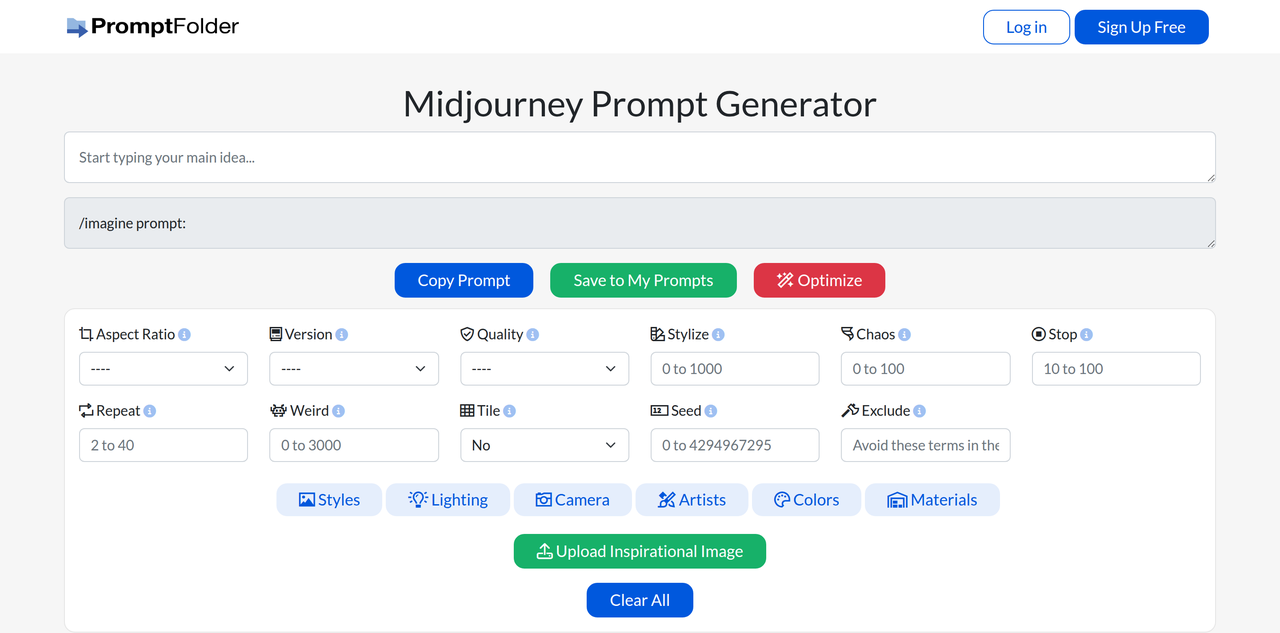
Key Features:
  • Interactive prompt builder for Midjourney
  • Parameter selection (aspect ratio, version, quality, stylize, chaos, stop, repeat, weird, tile, seed, exclude)
  • Extensive style presets (16-bit, Anime, Cyberpunk, Oil Painting, etc.)
  • Lighting options (Accent Lighting, Backlight, Moonlight, etc.)
  • Camera settings (DSLR, Macro Lens, Panorama, etc.)
  • Artist influences (Alphonse Mucha, Andy Warhol, Van Gogh, etc.)
  • Color and material selections
  • Option to upload inspirational images
  • Save and manage prompts within PromptFolder
Pros
  • Midjourney users who want to explore advanced parameters without memorizing them
  • Digital artists looking to experiment with different styles and lighting in their AI art
  • Content creators needing to generate specific visual concepts efficiently
Cons
  • Requires a Midjourney subscription to use the generated prompts
  • The effectiveness of the generated prompt still depends on user input and Midjourney's interpretation
  • Some advanced users might find the interface restrictive compared to direct prompt writing
Pricing
freemiumFree tier
Free tier:Limited daily uses for free tools (including this generator) without an account; additional use with a free account. Unlimited use with PromptFolder Pro.
Plans
  • Free: Limited daily uses
  • Free Account: Additional daily use
  • PromptFolder Pro: Unlimited use
Share:
Quick Decision
Try if: You frequently use Midjourney and want a structured way to build and manage complex prompts without memorizing all the parameters. It's especially useful for experimenting with different visual styles and effects.
Skip if: You prefer to write your Midjourney prompts from scratch, or you rarely use Midjourney and don't need a dedicated prompt-building tool.
Not for: Users not interested in AI image generation; Those who prefer to manually type out all their Midjourney prompts
Trust Signals
  • Founded


    2023
  • Team Size


    small
Tech Details
Platforms
web
Open Source
No
Support
Channels
email
Company
  • Name


    PromptFolder

PromptFolder is an AI prompt manager founded by Cole South, built to help users organize and manage their AI prompts for tools like ChatGPT and Midjourney.

FAQ

What is the Midjourney Prompt Generator?

The Midjourney Prompt Generator is a tool that helps users create detailed and effective prompts for Midjourney's AI image generation bot by providing a structured interface to select various parameters, styles, and artistic influences.

Is the Midjourney Prompt Generator free to use?

Yes, the Midjourney Prompt Generator can be used once per day without an account. Creating a free account unlocks an additional use per day. For unlimited use, a PromptFolder Pro subscription is required.

How does the Midjourney Prompt Generator help with creating images?

It helps by allowing users to easily select and combine various Midjourney parameters (like aspect ratio, version, quality), styles (e.g., Anime, Cyberpunk), lighting, camera settings, and artist influences, which can be difficult to remember and type manually. This streamlines the prompt creation process for more specific image generation.

Use Cases
  • Midjourney users who want to explore advanced parameters without memorizing them
  • Digital artists looking to experiment with different styles and lighting in their AI art
  • Content creators needing to generate specific visual concepts efficiently
AILookup

Research utility for AI tools. Compare reviewed profiles, distinguish listed tools from reviewed coverage, and track tool changes without marketing fluff.

© 2026 AILookup. All rights reserved.